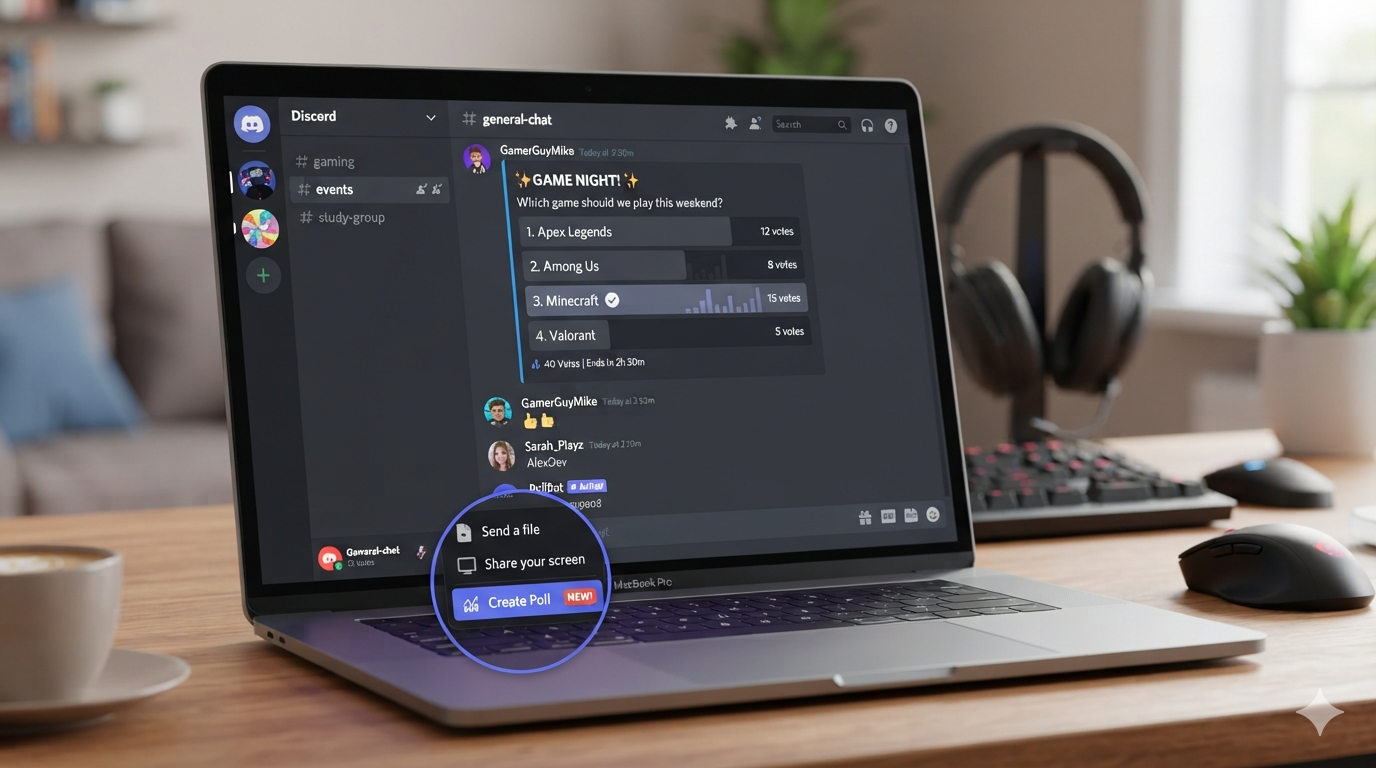
Discord is a popular place for gaming groups, friends, study teams, and online communities. Polls make it easier to ask questions and collect quick answers. You can use them to choose a game, plan an event, pick a meeting time, or simply ask what your community thinks. If you are wondering how to make a poll in Discord, the process is now easier than it used to be.
Discord offers a built-in Poll feature in supported versions of the app. This means you may not need a separate bot for simple voting. You can also use emoji reactions or dedicated poll bots when you need extra options. In this guide, you will learn each method in simple steps. We will also cover poll settings, anonymous voting, multiple answers, common mistakes, and useful examples. By the end, you should know which polling method works best for your Discord server.
What Is a Discord Poll?
A Discord poll is a simple voting tool that lets members choose between different answers. For example, a gaming server could ask, “Which game should we play tonight?” Members can then select their preferred option. Polls save time because people do not need to write separate messages. They also make results easier to understand.
If you are learning how to make a poll in Discord, first decide what you want to learn from your members. A good poll usually has one clear question. Its answer choices should also be easy to understand. Avoid adding too many options unless the topic requires them. Simple polls often get more responses because members can vote quickly. You should also explain the purpose of the poll when necessary. This small step can encourage more people to participate.
How to Make a Poll in Discord Using the Built-In Feature
The easiest way to create a poll is through Discord’s built-in Poll feature. Open the server and channel where you want to ask your question. Then look for the option to create a poll in the message area. Select it and enter your question. You can then add the answer choices you want members to see.
When exploring how to make a poll in Discord, check the available settings before publishing it. Depending on your Discord version and server permissions, you may be able to control the poll duration. You may also find settings for multiple answers and anonymous voting. Once everything looks correct, publish the poll. Members can then select their preferred answer. The built-in method is usually the best choice for simple community questions because it requires no third-party tool.
Step-by-Step Guide to Creating a Discord Poll
Creating a poll normally takes only a few moments. Start by opening Discord and entering your chosen server. Go to the channel where you want members to vote. Open the message composer and select the poll option if it is available. Enter a short and clear question.
Next, add your answer choices. Give each choice enough detail to help members understand it. Review the available settings before sending the poll. You can choose the voting period when the feature provides that option. You may also decide whether users can select more than one answer. Finally, publish the poll and wait for responses.
For anyone searching how to make a poll in Discord, these basic steps are usually enough:
- Open Discord.
- Select your server.
- Open the desired channel.
- Choose the Poll option.
- Enter your question.
- Add your answer choices.
- Adjust available settings.
- Publish the poll.
- Review the results.
Discord Poll Settings Explained
Poll settings can change how members interact with your question. One useful setting controls how long voting stays open. A short poll works well for quick decisions. A longer poll may be better for community planning or larger servers.
Another important option can allow multiple answers. This is useful when you want members to select several choices. For example, you could ask which games people own. Members could then choose every game they have. Anonymous voting can also be useful for sensitive opinions. However, anonymity may not always be ideal for community decisions that require accountability.
When considering how to make a poll in Discord, think about your goal before choosing these settings. The right configuration makes your results more useful. It also prevents confusion among members.
How to Make a Poll in Discord With Multiple Answers
Sometimes one answer does not fully represent what a member wants. Discord polls can support multiple selections when that option is available. This works well for questions such as, “Which games should we play this weekend?” Members could select several games instead of choosing only one.
To use this option, create your poll as normal. Add all relevant answers and look through the available voting settings. Turn on the option that allows multiple selections. Then publish your question. Tell members that they can select more than one answer.
Knowing how to make a poll in Discord with multiple answers can help you collect better feedback. However, use this feature only when multiple choices make sense. If your question requires one final decision, allowing several answers could make the result harder to interpret.
How to Make an Anonymous Poll in Discord
Anonymous voting can help people share honest opinions. It may be useful when asking about community rules, event preferences, or other topics where members might feel uncomfortable showing their choices. Discord’s available poll options may include anonymous voting depending on the feature and platform version.
If you want to understand how to make a poll in Discord anonymously, start by creating a standard poll. Look through the settings before publishing it. If an anonymous option is available, enable it. Then check the final poll carefully before sending it.
Remember that anonymous voting does not necessarily mean complete privacy in every situation. Server administrators may have different moderation tools and access to other activity. Avoid asking members to share private information through a public server. For normal community feedback, however, anonymous polls can make participation more comfortable.
How to Make a Poll in Discord Without a Bot
You do not always need a bot to create a poll. Discord’s built-in poll feature can handle many everyday voting tasks. This is useful for people who want a fast and simple solution. It also means you do not have to give a third-party bot access to your server.
If you are searching how to make a poll in Discord without a bot, use the native Poll option when your account and server support it. Create your question, add answers, adjust the settings, and publish it. This method is especially useful for smaller communities.
Using fewer third-party tools can also make server management easier. You have fewer permissions to review and fewer services to maintain. For basic voting, the built-in feature is often all you need.
How to Make a Poll in Discord With Emoji Reactions
Before built-in polls became widely available, many Discord users created votes using emoji reactions. This method can still work when a server does not have access to the native feature.
Write your question in a message. Then add one emoji for each answer. For example, you could use for “Yes” and for “No.” Members react with their preferred emoji. You can then count the reactions to determine the result.
This approach is simple, but it has limitations. Members can sometimes add or remove reactions. It can also become difficult to count votes in a busy channel. Still, it provides a useful backup method when learning how to make a poll in Discord without using dedicated polling tools.
How to Make a Poll in Discord Using a Bot
Poll bots can provide additional features for larger communities. Depending on the bot, you may get advanced voting options, commands, scheduled polls, or custom result displays. However, each bot works differently.
Before adding a bot, check what permissions it requests. Only give permissions that are necessary for its job. You should also review the bot’s reputation and documentation. Avoid installing unknown tools simply because they promise more poll features.
For users researching how to make a poll in Discord with a bot, the general process is simple. Add a suitable polling bot to your server. Follow its setup instructions. Use the required command or interface to create your question. Then publish the poll and monitor the results.
Built-In Poll vs Emoji vs Poll Bot
Different polling methods work better in different situations. The built-in Discord Poll feature is usually the simplest option. Emoji reactions are useful for quick yes-or-no questions. Poll bots may be better for communities that need advanced features.
| Poll Method | Best For | Main Benefit | Possible Limitation |
|---|---|---|---|
| Built-in Discord Poll | Everyday voting | Easy and integrated | Features can vary |
| Emoji Reactions | Simple votes | No setup needed | Manual counting |
| Poll Bot | Advanced communities | More features | Requires third-party access |
| Manual Messages | Very small groups | Flexible | Harder to organize |
If your goal is how to make a poll in Discord quickly, start with the built-in option. Try reactions when you need a basic backup. Consider a bot only when your server genuinely needs additional tools.
How to Write a Good Discord Poll Question
A strong poll starts with a strong question. Keep your wording short and specific. Avoid questions that contain several different ideas. Members should understand what you are asking without reading a long explanation.
For example, instead of asking, “What do you think about playing different games sometime this weekend?” ask, “Which game should we play Saturday?” The second question is easier to answer.
Your answer choices should also be balanced. Avoid choices that overlap too much. If one answer covers another answer, the results may become unclear. You can add an “Other” option when you expect members to have different suggestions.
Understanding how to make a poll in Discord is only part of the process. Good wording is what turns a basic poll into useful feedback.
Discord Poll Examples for Different Servers
Polls can help with many types of Discord communities. Gaming servers can ask members to choose the next game. Study groups can vote on meeting times. Creator communities can ask which topic should be covered next.
Here are some simple examples:
- Gaming: Which game should we play tonight?
- Study: Which topic should we review next?
- Community: Which event should we host this month?
- Friends: Where should we eat this weekend?
- Creators: Which video topic should come next?
- Moderators: Which server rule needs clarification?
These examples show why people search how to make a poll in Discord for many different reasons. The tool is simple, but its uses are broad. A well-designed poll can help a community make decisions faster and give quieter members an easy way to share their opinions.
Common Discord Poll Mistakes to Avoid
One common mistake is adding too many answer choices. A long list can overwhelm members. Try to keep choices focused and relevant. Another mistake is writing a question that can be interpreted in several ways. Clear wording leads to clearer results.
You should also avoid changing the question after voting begins. If the question changes, existing votes may no longer represent what members intended to answer. Instead, create a new poll when a major change is needed.
Another issue is ignoring the poll deadline. If you need a decision by Friday, tell members when voting closes. This gives everyone a clear timeframe.
Learning how to make a poll in Discord is easy, but managing the poll well requires some planning. Clear questions, useful choices, and a defined deadline can make a major difference.
Tips for Getting More Votes
Even a great poll may receive few responses if members do not notice it. Post the poll in the right channel. Avoid placing important questions in a channel that receives heavy message traffic.
You can also introduce the poll with a short message. Tell members why their vote matters. For example, “We are planning Saturday’s game night. Please vote before Friday evening.” This gives people a reason to participate.
Do not create too many polls at once. If every message asks members to vote, they may start ignoring them. Use polls when a real decision needs community input.
When you know how to make a poll in Discord, the next step is learning when to use one. Good timing and clear communication can increase participation without annoying your members.
How to Check Discord Poll Results
After members begin voting, you can watch the poll results through the poll itself. The display can show how many votes each answer receives. Results may change while the poll remains active.
Wait until the voting period ends before making an important decision. If the poll is still open, members can continue changing their choices when the available settings allow it.
For major community decisions, consider sharing the final result afterward. You could say, “The community voted for Game A, so we will play it Saturday.” This closes the loop and shows members that their votes mattered.
Once you understand how to make a poll in Discord, checking results is generally straightforward. The most important part is using those results fairly and communicating the final decision clearly.
Frequently Asked Questions
1. Can I make a poll directly in Discord?
Yes. Discord has a built-in Poll feature on supported versions and servers. Open the message area and look for the Poll option. Add your question and answers, adjust the available settings, and publish it. If you cannot see the feature, update Discord and check whether your server or account has access to it.
2. Do I need a bot to create a Discord poll?
No. You can use Discord’s built-in Poll feature when it is available. Bots are optional and can provide additional features. For simple questions, the native tool is usually easier because it does not require additional setup or third-party permissions.
3. Can Discord polls have multiple answers?
Yes, supported poll settings can allow members to choose multiple answers. This is useful for questions where several choices may apply. For example, you can ask members which games they would like to play. They can select every suitable option instead of choosing only one.
4. Can Discord polls be anonymous?
Discord supports anonymous poll settings in supported poll experiences. If the anonymous option is available, you can enable it before publishing. Always review the settings carefully because privacy features can vary by feature and platform version.
5. Can I create a poll using emoji reactions?
Yes. Emoji reactions are an older and simple way to collect votes. Post a question and assign an emoji to each answer. Members react to the option they prefer. This method works well for basic questions but can be harder to manage in busy channels.
6. What makes a good Discord poll?
A good poll has one clear question and simple answer choices. Keep the number of options reasonable. Tell members when voting closes if there is a deadline. Most importantly, use the results for a clear purpose. This helps members feel that their participation is valuable.
Conclusion
Learning how to make a poll in Discord is simple once you understand your available options. The built-in Poll feature is usually the best place to start. It provides an easy way to ask questions and collect votes without adding extra tools. Emoji reactions can work as a simple alternative, while bots can help communities that need more advanced features.
The key is not only knowing how to create a poll. You also need to ask clear questions, choose useful answers, and give members enough time to respond. Keep your polls short and relevant. Share the final decision when appropriate. With these simple habits, Discord polls can become a useful part of your community management strategy.
Leave a Reply